
Why use Instagram to share your story?
-
Tell your story using photos, videos or drawings
Instagram is a very visual social media platform, great if you like being creative.
-
It's easy to use, anywhere
You can edit images and video right in the app, no fancy software or skills required.
-
Connect with a thriving mental health community
Use mental health-related hashtags to connect with others.
Setting up your account
You'll need:
- A smartphone or tablet - Instagram only works fully on mobile devices
- An email address and secure password
- A username
- A profile picture and short bio introducing yourself
Instagram basics
- Photos and videos are viewed as a square, not portrait or landscape - so take this into account when creating content.
- Use text captions to add more detail to your post. These have a limited (but lengthy) word count and can include hashtags and emojis.
- You can't currently include clickable links in your text captions. But on your main profile settings, you can include one link:
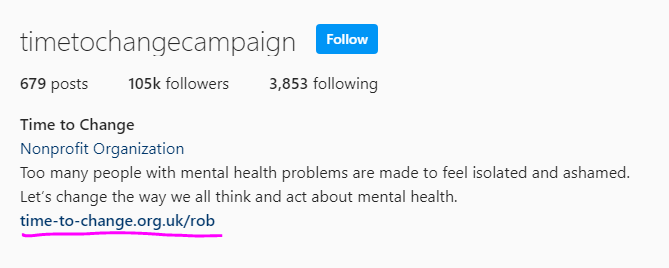
You can update this each time you post, and ask people to 'follow the link in my bio'.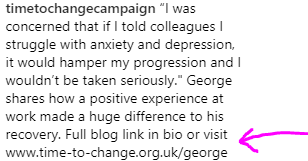
You could also consider using a tool such as Linktree to link to your Instagram blogs - this allows you to leave one link on your Instagram profile, and you curate your content on the Linktree app.
Top tip: If you're using Instagram to promote your blog and you don't have a suitable photo, you could use Canva to make a nice text-based image with the title or a quote from the post.
Following and followers
It takes some time to build up followers - so don't be disheartened or compare yourself to others if you only have a few to begin with.
- The best way to gain followers is to post regularly, follow others, and use relevant hashtags on your posts.
- Try searching for 'mental health' and other keywords or hashtags to find people in the mental health community. You can do this in the 'Explore' section - click the magnifying glass icon at the bottom of the screen. After you've started following a few people, Instagram will start recommending similar accounts to you.
It might sound obvious but don't: buy followers, ask people to follow you en masse, or keep follow/unfollowing people to get their attention. This is spammy and you're likely to be ignored, blocked or reported.
Instagram Stories
Stories offer you a different way of sharing your content.
- A Story can include photos, videos, text, emoji, gifs, filters, polls, a question box, and more.
- They're viewed in portrait mode.
- Each frame lasts a maximum of 7 seconds (photos and text) and 15 seconds (video).
- Stories stay on your profile for just 24 hours. After that, your followers won't be able to see them, unless you add them as a highlight to your profile.
It's pretty intuitive to build a story - swipe right from your main feed to enter Story mode and start experimenting! You can also read our tips for Instagram Stories.
Keeping safe
It's exciting getting likes and comments, but it's important to be aware of the impact of social media on your own mental health.
- How is your time online making you feel? If you find yourself feeling angry, upset, anxious or concerned, it's okay to step away for a while.
- You can change notification settings on Instagram and even switch them off entirely, which can help to create space away from social media.
- Instagram also has privacy settings that you can change at any time.
- You can block or report users if you don't want to engage with them.
Be mindful about the types of information you share online. Sharing your real-time location, times when you'll be away from home for extended periods, etc. can be risky.
Read more about staying safe online >
On Instagram especially, there can be a strong feeling of having to live up to certain pressures. Remember, you can step away from the channel if it's making you uncomfortable.
Useful resources
Tips for your Instagram Stories
Instagram Stories: The Complete Guide to Using Stories - Buffer