
Twitter threads
Twitter threads allow you to tell your story in a more in-depth way than a single tweet. A thread is a collection of more than one tweet, connected so that they can be read one after another.
To make a thread, click on the reply/comment button on your previous tweet: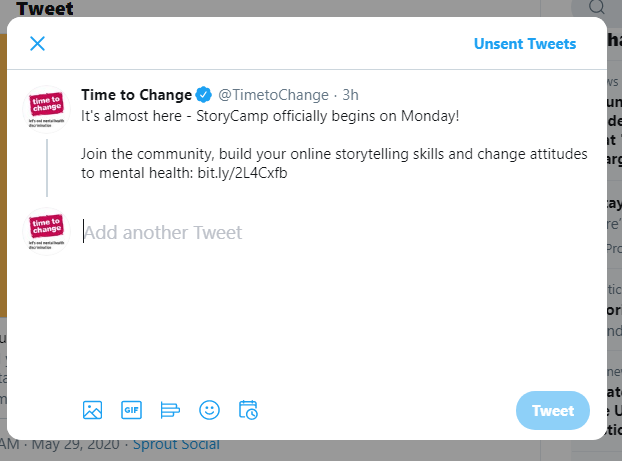
Tips for threads
- Think about the pace of your story. It should have a beginning, middle and an end.
- Start with an introduction ("I am going to tell you a story about …" Or: "This is a thread about…").
- End with an end (eg Thanks for reading…. etc). You could also use the final tweet to link to somewhere with more information about the topic ("Visit www.time-to-change.org.uk/asktwice for more tips on starting a mental health conversation with a mate")
- Try and include one idea per tweet
- Keep tweets short and make the thread readable. A thread of 20 tweets, each using all 280 characters is a lot to read and may put people off.
- Images or GIFs can help to bring it to life or add pace to your story.
- If you want more people to see your thread, you could try using a hashtag or pin it as your top tweet or DM / share it with friends.
Ideas to get you started
- Create a thread sharing five things you want someone to know about what it is like living with a mental health condition.
- Tell the story of the first time you told someone about your mental health condition and how they responded.
- Share your three favourite mental health resources or blogs that you think do a great job at fighting stigma.
Examples we like
- ZeeAvi in Malaysia talks about the stigma of mental health
- Kayla shared pictures from her home showing how she has decorated the space to look after her mental health
- Adam Ruehmer used a thread to talk about his depression
- Hajra Khan shares her story of depression and anxiety.
- Oona created a short thread using illustrations of things which improve her mental health.
If you find you have too much to say for a thread, your story may work better as a blog post or video.
Twitter Moments
You could also play around with Twitter Moments, a way of bringing previous tweets together – like a library or an archive. Use a Moment to collect your own tweets and/or to tell a wider story through tweets from other people. Here are some of the Time to Change Moments we've made to give you more ideas.
There are lots of creative ways you can use a Moment.
Tips for Moments
- As with all stories, structure them around a beginning, middle and end.
- Keep your Moment short – between 5-15 tweets.
- Come up with a short and snappy title which describes what your Moment is about.
- Use a strong cover image which attracts attention.
- Once you've published it, share your Moment in a tweet.
Ideas to get you started
- You could use a Moment to bring together a series of individual tweets you have shared on a particular theme.
- Use a Moment to show how things have changed for you over time. For example, get organised and tweet on the first day of every month. Then at the end of the year, turn them into a Moment.
- You could make a Moment out of other people’s tweets you like on a theme or from an event or which join in with a hashtag. What do these say about people’s views of mental health?
- You could ask your followers a question and make a Moment from the responses.
- Why not make a Moment out of quotes or images or messages which are good for your mental health? You can then look at these when you need a boost. And share with others to help them too.